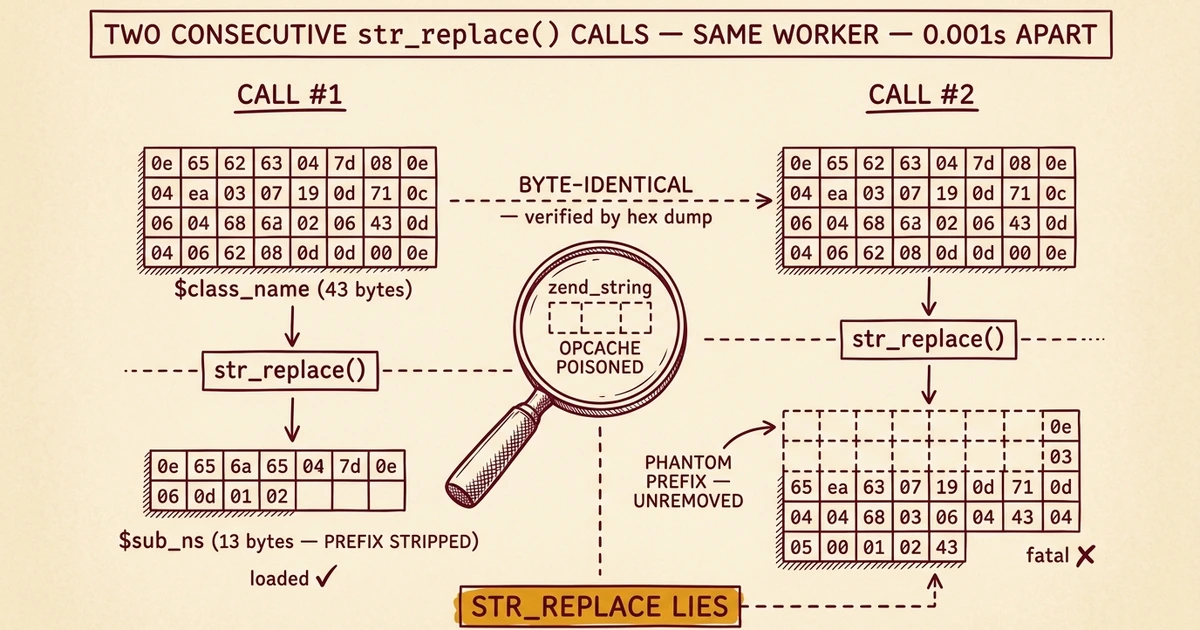
Field Notes from 2026-04-23. One client site disconnected from MainWP. Cached pages still loaded fine. The fatal hid in admin, AJAX, and dashboard syncs, the kind of failure mode you can miss for days.
This is what we found when we went looking.
The symptom
One Tuesday morning, our MainWP dashboard flagged one of our managed sites as disconnected. Nothing else looked wrong. The site's homepage loaded normally for visitors. Search engines weren't seeing errors. Internal monitoring was green on uptime.
Then we tried to actually do anything in the WordPress admin and got a 500. Same with any AJAX request. Same with any cache-bypassed front-end request:
PHP Fatal error: Uncaught Error: Class "MainWPChildChangesChanges_Loggers_Loader" not found
in /wp-content/plugins/mainwp-child/modules/changes-logs/classes/class-changes-logs.php:58
Stack trace:
#0 .../class-changes-logs.php(44): MainWPChildChangesChanges_Logs->__construct()
#1 .../changes-logs.php(54): MainWPChildChangesChanges_Logs::instance()
#2 .../mainwp-child.php(160): include_once('...')
#3 wp-settings.php(560): include_once('...')
...
The class file existed. The path looked right. The plugin was the latest version. And yet PHP couldn't find the class. The investigation that followed went deeper than expected, and ended in a place we didn't see coming.
What this looks like in production
Two things made this failure mode pernicious:
- LiteSpeed Cache hides it from visitors. The fatal only fires when PHP actually executes, cached pages serve from disk and never touch the broken code path. So the front-end stayed green. Anyone watching uptime monitors saw a healthy site.
- The dashboard goes quiet, not loud. When MainWP's sync request itself fataled, we got a disconnect notification. But on requests where the fatal happened slightly differently in the timing, the dashboard saw a partial or empty response and just marked the sync as "completed" with no warning. We had sites that had been silently broken for hours before we noticed.
If you operate WordPress at any kind of scale, this is the failure mode that scares you. Not the dramatic crash everyone notices, but the silent rot in admin and sync paths that you only catch when something downstream finally breaks.
First reasonable theories (and why they were wrong)
We worked through the obvious explanations first. Each one looked plausible. None of them held up.
"It's a corrupted plugin install." So we forced a reinstall via WP-CLI. The fatal kept firing within minutes.
"The new plugin version probably fixed it." MainWP shipped 6.0.9 the next day. We applied it fleet-wide. The bug came back on the same site.
"It's an OPcache issue, let's invalidate everything." We touched every PHP file in the plugin to force OPcache revalidation. We killed every active lsphp worker for the site's user. Worked for ten minutes, then the fatal returned.
"Plugin conflict, something else is hooking the autoloader." We compared the affected sites' active plugin lists with sites that weren't affected on the same server. They had identical plugin sets. Same versions. Same Beaver Builder. Same code snippets plugin. Same WordPress core. Even identical snippets active.
At this point we'd ruled out everything reasonable and were staring at three sites on the same server, identical software stack, where one specific autoloader call randomly failed and four other sites with the same setup had no problem. We needed real data, not more theories.
Instrumenting the autoloader
The buggy code was in mainwp-child/includes/functions.php, specifically the mainwp_child_modules_loader() function. The path computation looks like this in MainWP's source:
$sub_ns = str_replace( $base_ns, '', $class_name );
$esc_position = strrchr( $sub_ns, '\\' );
$class_name_no_ns = substr( $esc_position, 1 );
$sub_dir = str_replace( $class_name_no_ns, '', $sub_ns );
$sub_dir = str_replace( '\\', '/', $sub_dir );

if ( '/' !== $sub_dir ) {
    $autoload_path = sprintf( '%s/modules/%s/%s/class-%s.php', /* ... */ );
} else {
    $autoload_path = sprintf( '%s/modules/%s/classes/class-%s.php', /* ... */ );
}
For a class like MainWPChildChangesChanges_Logs, the function is supposed to:
- Strip the
MainWPChildChangesnamespace prefix →Changes_Logs - Compute that there's no sub-namespace →
$sub_dir = '/' - Build path:
modules/changes-logs/classes/class-changes-logs.php
We patched the function in place with error_log() calls dumping the hex bytes of every variable at the moment the path was computed. Then we waited for the fatal to fire and looked at what we caught.
The wait-what moment
Two consecutive autoload calls. Same lsphp worker. Milliseconds apart. We captured this:
cls=MainWPChildChangesChanges_Logs
  base_ns_len=20  base_ns_hex=4d61696e57505c4368696c645c4368616e676573  ("MainWPChildChanges")
  sub_ns_len=13   sub_ns_hex=5c4368616e6765735f4c6f6773                 ("Changes_Logs")
  sub_dir=/       exists=YES                                            → loaded ✓

cls=MainWPChildChangesChanges_Loggers_Loader
  base_ns_len=20  base_ns_hex=4d61696e57505c4368696c645c4368616e676573  ("MainWPChildChanges"), IDENTICAL
  sub_ns_len=43   sub_ns_hex=4d61696e57505c4368696c645c4368616e6765735c4368616e6765735f4c6f67676572735f4c6f61646572
                                                                         ("MainWPChildChangesChanges_Loggers_Loader"), UNCHANGED
  sub_dir=MainWP/Child/Changes  exists=NO                                → fatal ✗
Read that carefully.
The first call: str_replace($base_ns, '', $class_name) correctly removed the 20-byte prefix and produced a 13-byte result.
The second call, microseconds later in the same PHP process with the byte-identical $base_ns: str_replace returned the unchanged 43-byte input. It just... didn't strip the prefix. Even though the prefix was sitting right there at position 0 of the haystack.
We re-checked the obvious things. The hex dumps confirmed there were no hidden characters in $base_ns, no trailing whitespace, no null bytes, no Unicode lookalikes. The first 20 bytes of $class_name were byte-for-byte identical to $base_ns. We confirmed via strpos($class_name, $base_ns) === 0 on the line above the failing str_replace.
And yet for one of those two consecutive calls, str_replace behaved as if the needle wasn't there.
Yes, this is a PHP-level bug
We don't say that lightly. str_replace is one of the most-used functions in PHP. It's been in the language since PHP 3. Saying "it's broken" feels like saying "the keyboard is broken" when you can't type a password, it's almost always you, not the keyboard.
But the evidence is what it is. Same function. Identical inputs (verified bytewise). Same process. Different result. There's no PHP-level explanation that doesn't involve runtime corruption of one of the function's argument representations.
Our working theory is OPcache zend_string interning. PHP interns string literals that appear in compiled bytecode, they get stored once in shared memory and reused by reference. Under load, OPcache occasionally produces a state where one of those interned strings becomes invalid or aliased to wrong memory. str_replace reads what it thinks is the haystack, but it's actually pointing to a corrupted view of the needle, so the comparison silently fails to match anything.
This is a hard class of bug to reproduce on demand. It manifests under specific load patterns, accumulates over time in long-lived lsphp workers, and clears whenever the file's bytecode gets re-cached. (Which is why touching the file would temporarily "fix" it, until the same OPcache state re-developed.)
We've reported it to MainWP. They didn't write the bug, but the line of code they have is the one tripping over it. There's a trivial fix that sidesteps the bug entirely.
The fix is one line
Two reasons this works. First, substr is a deterministic byte slice, it doesn't compare strings, it just copies bytes from an offset. There's no interning, no needle-matching, nothing that can be corrupted by OPcache state. It does exactly what it says, every time.
Second, it's actually better code. The function already verified the prefix is at position 0 via strpos on the line above. Once you know the prefix is at position 0, you don't need pattern matching to remove it, you just need bytes after position strlen($base_ns). substr expresses the intent more clearly than str_replace does.
We patched this on three sites and watched. Before the patch, those sites would fatal within hours of any OPcache reset. After the patch, they've been stable through every sync, every admin login, every cron tick, every cache-busted request we threw at them.
Shipping the fix (and what we got wrong the first time)
Patching plugin source files is fine for emergencies but doesn't survive plugin updates. We needed something that would persist across MainWP releases without us re-applying it every time.
Our first attempt was a code snippet, drop it into any code snippets plugin, two layers, belt and suspenders:
- OPcache invalidation: Call
opcache_invalidate()onmainwp-child/includes/functions.phpevery request. Whatever poisoned interning state existed in the cached opcode gets cleared, and the next call re-caches from disk. - Prepended autoloader: Register an additional
spl_autoload_registerwithprepend=truehandling theMainWPChildChanges*namespace usingsubstr-based path computation. Runs before MainWP's autoloader, so even if MainWP's version would have failed for a class, ours has already loaded it.
It worked. Sort of. We deployed it, ran our test syncs, watched the logs go quiet, declared victory.
Then the dashboard flagged a site as disconnected the next time someone hit "reconnect," and the fatal returned. The snippet hadn't fixed it after all.
The race condition we missed
Code snippets plugins typically defer snippet execution to a hook like plugins_loaded or init, both of which fire after WordPress finishes loading every plugin file. That's fine for almost every snippet you'll ever write, because almost every snippet's job is to add filters and actions that fire later.
But our snippet's job is different. It needs to register an autoloader before MainWP Child's plugin file loads, runs its changes-logs.php include, instantiates Changes_Logs, and triggers the autoload for Changes_Loggers_Loader. All of that happens during the plugin file load loop in wp-settings.php, before any hook our snippet listens to fires.
Net effect: on the very first request hitting a fresh lsphp worker, our snippet's spl_autoload_register runs too late. The buggy autoloader has already fataled. The snippet's opcache invalidation helps the next request, but the current request is already a 500, and on a low-traffic admin/AJAX request, the worker may not survive long enough for "next request" to matter.
The fix that actually works: a must-use plugin
Must-use (mu) plugins load before regular plugins. Always. WordPress's plugin loading order is hardcoded: mu-plugins first, then regular plugins, then themes. So if we define our corrected mainwp_child_modules_loader() function in a mu-plugin file, MainWP's wrapping if ( ! function_exists() ) guard skips its own buggy version. Our function is the only one that ever runs.
Here's the full mu-plugin, drop it as wp-content/mu-plugins/mainwp-child-autoloader-fix.php:
<?php
/**
 * Plugin Name: MainWP Child Autoloader Fix
 * Description: Workaround for OPcache str_replace() bug in MainWP Child 6.0.x.
 *              Defines mainwp_child_modules_loader() before mainwp-child loads,
 *              so MainWP's function_exists guard skips its own buggy version.
 *              Uses substr (deterministic byte slice) instead of str_replace.
 * Version: 1.0.0
 */

if ( ! defined( 'ABSPATH' ) ) {
    exit;
}

if ( ! function_exists( 'mainwp_child_modules_loader' ) ) {
    function mainwp_child_modules_loader( $class_name ) {

        // mainwp-child defines this constant during its load; if we're
        // somehow called before that, bail safely.
        if ( ! defined( 'MAINWP_CHILD_PLUGIN_DIR' ) ) {
            return false;
        }

        $namespaces_modules = array(
            'MainWPChildChanges' => 'changes-logs',
        );
        $autoload_dir = rtrim( MAINWP_CHILD_PLUGIN_DIR, DIRECTORY_SEPARATOR );

        foreach ( $namespaces_modules as $base_ns => $mod_dir ) {
            if ( 0 === strpos( $class_name, $base_ns ) ) {

                // THE FIX: substr instead of str_replace. Deterministic byte slice,
                // no string comparison, immune to the OPcache interning bug.
                $sub_ns = substr( $class_name, strlen( $base_ns ) );

                $esc_position = strrchr( $sub_ns, '\\' );

                if ( false !== $esc_position ) {
                    $class_name_no_ns = substr( $esc_position, 1 );
                    $sub_dir          = str_replace( $class_name_no_ns, '', $sub_ns );
                    $sub_dir          = str_replace( '\\', '/', $sub_dir );

                    if ( '/' !== $sub_dir ) {
                        $sub_dir       = trim( $sub_dir, '/' );
                        $autoload_path = sprintf( '%s/modules/%s/%s/class-%s.php', $autoload_dir, $mod_dir, strtolower( $sub_dir ), strtolower( str_replace( '_', '-', $class_name_no_ns ) ) );
                    } else {
                        $autoload_path = sprintf( '%s/modules/%s/classes/class-%s.php', $autoload_dir, $mod_dir, strtolower( str_replace( '_', '-', $class_name_no_ns ) ) );
                    }
                    if ( file_exists( $autoload_path ) ) {
                        require_once $autoload_path;
                    }
                }
                return true;
            }
        }
        return false;
    }
}
That's it. No hooks, no opcache games, no race conditions. The function is defined the moment WordPress loads the mu-plugin, which is before the buggy version ever gets a chance to take its place.
Both versions (mu-plugin and the original code snippet, kept as a fallback) are on GitHub Gist. MIT license, fork it, ship it.
What this taught us
Some takeaways for anyone who manages WordPress at scale:
Cached front-end is not "site is up." If your monitoring only checks visitor-facing pages, you're not seeing the admin and sync paths that actually run the business side. We extended our checks to include uncached endpoints precisely because of this incident.
Plugin updates are not always fixes. 6.0.9 had no autoloader changes in its changelog and didn't fix the bug, but updating the plugin temporarily looked like a fix because reinstalling the files invalidates OPcache. Treat "fixed by reinstall" with suspicion. If the underlying state can re-develop, the bug isn't fixed; it's just been pushed back a few hours.
Don't rule out "PHP itself" too quickly, but don't reach for it too fast either. We spent two days on plugin reinstalls, version upgrades, plugin conflict comparison, and OPcache fiddling before we instrumented the autoloader and got real data. In retrospect we should have instrumented sooner. Sometimes the fastest path to the answer is dumping hex bytes from inside the function and asking "what does this thing actually see at the moment it fails?"
The right fix is often the simpler fix. The original code uses str_replace to remove a prefix. str_replace is a pattern-matching function, it scans the haystack looking for occurrences of the needle. When you already know the needle is at position 0, that's overkill. substr with a length offset is more direct and has fewer ways to fail. The same kind of unnecessary use of pattern-matching when you only need byte-slicing shows up in a lot of PHP codebases. If you're scanning your own code for similar patterns, prefix-strip via str_replace is the one to look for.
Why this matters for our agency clients
Most managed WordPress hosts will tell you "it's a plugin issue, contact the developer." That's technically correct and entirely useless when your client's dashboard is broken and you need answers today.
The work in this post, instrumenting a third-party plugin in production, hex-dumping memory state, identifying the underlying PHP issue, shipping a portable fix, and filing it upstream so the patch lands for everyone, is what we do for the agencies and developers we host for. Not because every bug is this deep, but because when one is, you want a host whose first reaction is "let's look at it" rather than "open a ticket with the plugin author and wait."
If you're an agency running multiple WordPress sites and you've ever wondered why your hosting provider's support ticket keeps you waiting three days to be told "we recommend you reach out to the plugin developer," this is the difference. Field notes from our agency hosting, written by the people who actually do the work.
If you're hitting this exact bug on a MainWP-managed site, the mu-plugin above is the fix. Save it as wp-content/mu-plugins/mainwp-child-autoloader-fix.php. We'll update this post with MainWP's response once we hear back from them.
Is this you?
If you manage WordPress at any kind of scale, three questions worth asking about your operating model.
- If your dashboard or admin path silently broke on a client site, how would you find out? Cached front-ends keep visitors happy while admin and AJAX paths fail behind the scenes. Uptime monitors that only check public URLs miss this entire failure class. You need uncached endpoint checks too. Same operating discipline that surfaced our silent Redis cache failures across six sites and our fleet-wide email delivery monitor: someone has to be watching the back-end paths, not just the homepage.
- When a third-party plugin breaks in a way you can't pin to your own code, what's your debug protocol? If the answer is "open a ticket with the plugin author and wait three days," you're going to spend a lot of time waiting. The faster path is to instrument the failing function in production, dump the actual variable contents at the moment of failure, and read what the data tells you. Hex bytes do not lie.
- When a "fix" works for ten minutes and then comes back, what's your assumption? If reinstalling the plugin or touching files temporarily clears the bug, that strongly suggests OPcache state is involved. The underlying bug is still there; only the cached opcode got refreshed. Treat "fixed by reinstall" with suspicion, especially under sustained load. Same operating posture we apply when bot-protection rules iterate: every fix is a hypothesis until it survives load.
If any of those answers made you uncomfortable, the fix is to treat your hosting platform as an active operations function, not a static plumbing layer. The kind of work in this post is what every site we manage gets when something goes wrong: active human-led debugging backed by fleet-wide intelligence.

No comments yet. Be the first to comment!
Leave a Comment